









Research spread across a dozen open tabs rarely stays organized for long, and switching between a search engine, a notes app, and a separate chat window breaks the flow of reading. An AI sidebar for research keeps summarizing, note-taking, and model access in one panel next to the page already open. Sider, built as a browser extension rather than a standalone app, follows that structure, opening alongside whatever page is on screen.
What Sider AI Does: Research and Summarization in the Browser
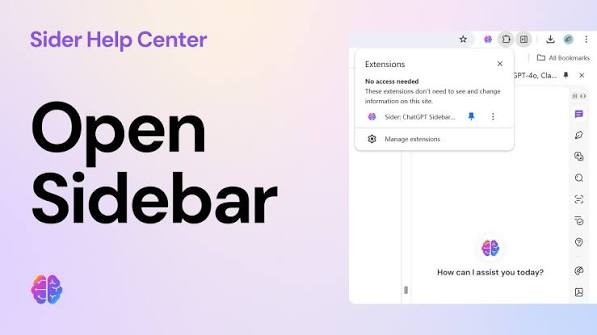
Sider installs as a browser extension and opens as a panel beside the page being viewed. Instead of copying text into a separate chat window, the panel reads the open page and answers questions about it directly. The stated aim is one AI panel for everything done in the browser, in place of a patchwork of open tabs and separate tools.
For anyone comparing options for an AI sidebar for research, this is the central idea behind Sider. It brings together summarization, note capture, and chat access to several AI models inside a single interface attached to the browser.
Summarizing Web Pages and Articles with Sider

One of the more direct uses of the panel is condensing long articles or dense documentation into shorter summaries. Instead of reading a page from top to bottom, a person can prompt the panel to pull out its main points. For research that involves scanning many pages before a handful get read in full, this is one of the more practical uses of an Research.
Summarization sits inside the same panel used for chat, so a summary can be followed right away by a clarifying question. Because the original page stays open the whole time, follow-up questions stay anchored to the source material instead of drifting into a separate conversation. That continuity is a structural feature of the panel, not a measured outcome, but it does mean the reading and the questioning happen in the same place.
Taking Notes and Generating Reports Directly in the Sidebar
Beyond summarizing, the panel also supports note-taking and report generation without a separate document editor. A person moving across several tabs can capture findings as they go, rather than exporting text elsewhere and losing track of which note came from which source. This keeps the research trail closer to the original material.
Generating a report from gathered notes happens inside the same workflow, not as a separate step requiring new software. For content work built from multiple references, that arrangement means fewer places information has to pass through before reaching a finished draft.
Switching Between AI Models: ChatGPT, Gemini, Claude, and More

A defining feature of Sider is that it is not built around a single language model. Sider states that the panel is powered by ChatGPT, Gemini, Claude, Grok, Deepseek, and other leading models, named together as the engines behind its chat function. The brand does not explain how access to each model is arranged behind the scenes, so it is fairer to say the panel draws on this range of models rather than that each one works identically or under the same account setup.
- ChatGPT is named among the models behind Sider, associated with general-purpose conversational responses for drafting and explaining.
- Gemini is one of the models powering the panel, offering an alternative response to the same query without leaving the page.
- Claude is also named in the lineup, associated with longer-form reasoning and text generation.
- Grok is included among the models powering the panel, according to the brand.
- Deepseek rounds out the named models, extending the stated range of AI systems behind the panel.
Having this range available inside one AI sidebar for research means a question can be rephrased or re-run against a different named model if an answer feels incomplete. Naming several providers under a single panel is one of the more practical differences from a tool built around only one model.
Sider’s Workflow Integration for Researchers and Content Workers
Because the panel lives inside the browser itself, it follows a person from search results to documentation to long-form articles without opening a separate application. This matters for content work built on multiple open references, since summarizing, note-taking, and chatting all happen where the reading happens. As a result, the workflow stays in one place instead of moving between apps.
For academic or professional research, the same structure applies. A person comparing several sources for a report can summarize each one, drop key points into notes, and then ask for help structuring a draft, all without closing the original tabs. Keeping summarization, notes, and multi-model chat under one roof is the practical case for calling an AI sidebar for research a single tool rather than a bundle of separate utilities.
10 Million Active Users and Persistent Updates
Sider reports more than 10M active users and over 100K five-star ratings, figures that point to broad adoption as a browser extension. It has also been named among Chrome’s Editors’ Picks and recognized as a Favorite of the Year in the webpage plugin category. These marks tend to accumulate through sustained, everyday use rather than a brief spike in downloads.
The extension is installed through an Add to Chrome path rather than a separate download, and it continues to receive updates. For anyone weighing an AI sidebar for research as a long-term fixture in a browser rather than a one-off trial, that scale of adoption is one of the more concrete signals available.
Whether a browser panel replaces the usual mix of tabs, note apps, and chat windows comes down to how often research actually happens inside the browser itself.